

Stop Managing Your Mac Mini Cluster with Spreadsheets and Terminal Tabs — RackMini Is Coming
By Doxmini Team
If you've ever stacked two or more Mac Minis on a shelf and called it a server rack, this app is for you.
We sell Mac Mini accessories — rack mounts, cases, stands, and more. But we also use Mac Minis — every single day. And after years of managing our own clusters, we got tired of the same problems every Mac Mini homelabber faces. So we built the tool we wished existed.
It's called RackMini, and it's coming soon.
The Problem Every Mac Mini Cluster Owner Knows Too Well
You bought your second Mac Mini. Maybe your third. You're running a Plex server, a build farm, a home automation hub, or a self-hosted AI rig. The hardware is elegant. The setup looks clean on your shelf.
But the management is a mess.
Sound familiar?
- You have a Notes doc somewhere with IP addresses, SSH passwords, and which Mini is which.
- You keep six Terminal tabs open just to check if everything is still running.
- You've SSHed into the wrong machine and run a command on the wrong node — more than once.
- You have no idea how much disk space is left on your media server until it's too late.
- The cables behind your rack look like spaghetti, and you can't tell which Ethernet cable goes where without tracing it by hand.
- You've thought about Grafana or Prometheus, but that's overkill for four Mac Minis on a bookshelf.
Enterprise tools are built for 500-node data centers. Hobbyist scripts break the moment you add a new machine. There's nothing in between — nothing designed specifically for a small Mac Mini cluster.
Until now.
Introducing RackMini: A Native macOS App for Your Mac Mini Cluster
RackMini is a free, local-first macOS app that gives you a single dashboard to monitor, manage, and document a small cluster of 2 to 10 Mac Minis. No cloud. No subscriptions. No data leaves your network.
It connects to your nodes over SSH — the same way you already do — and pulls real-time metrics directly from each machine. Everything runs on your Mac, stays on your Mac, and works even if your internet is down.
Here's what it does.
A Real-Time Dashboard That Actually Looks Good
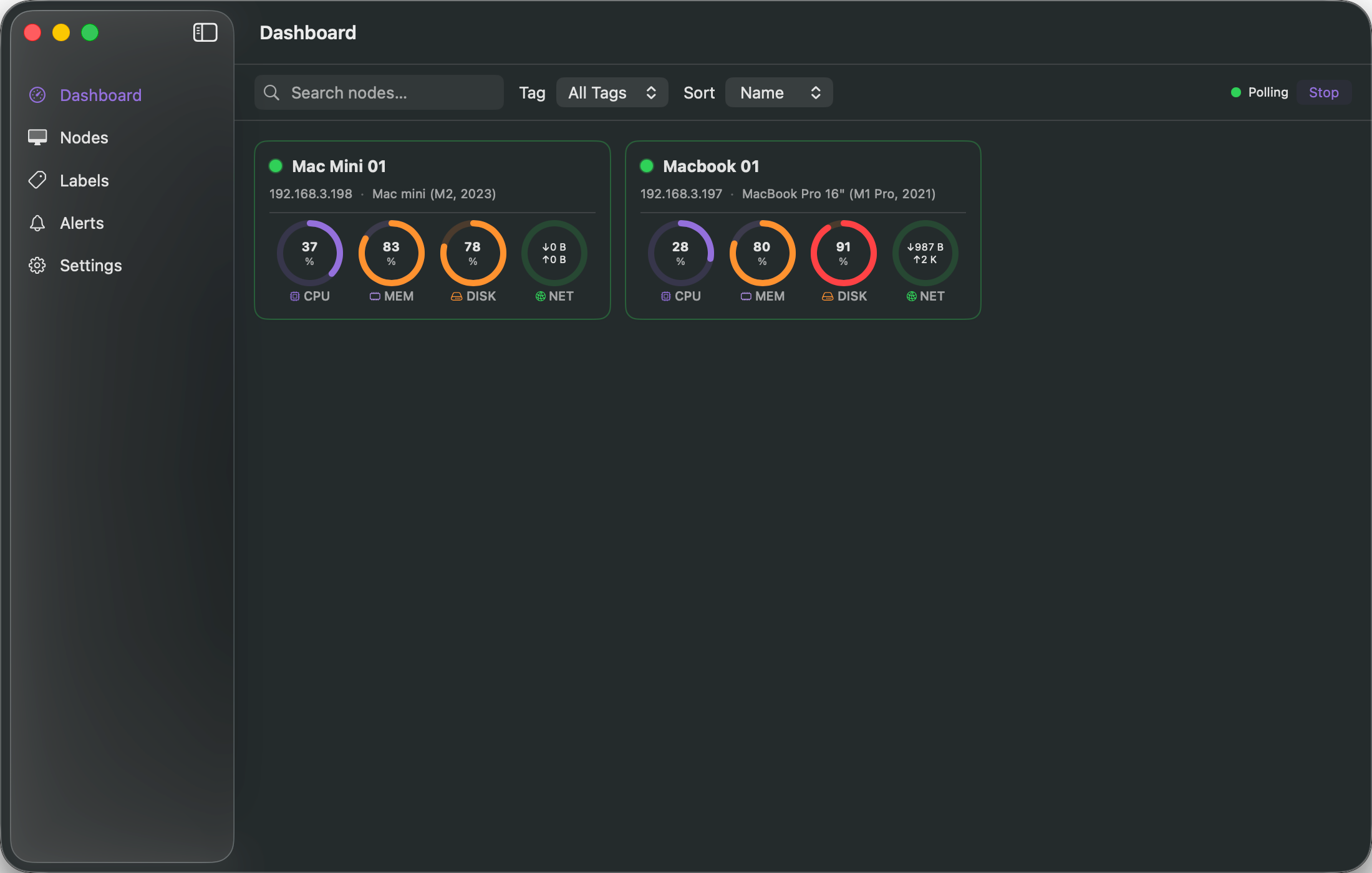
Open RackMini and you see every node at a glance. Each Mac Mini gets a card showing:
- Status — online, offline, or unknown, with a color-coded indicator
- CPU usage — real-time percentage with a circular gauge
- Memory usage — how much RAM is in use vs. available
- Disk usage — how full the drive is, so you never run out of space by surprise
- Network throughput — live upload and download speeds
The dashboard auto-refreshes every few seconds (you choose the interval, from 2 to 30 seconds). Cards are searchable, sortable by name or resource usage, and filterable by tags. You can sort by "most CPU usage" to instantly spot the node that's working hardest.
Right-click any card to copy the SSH command, copy the IP address, or test the connection — without opening Terminal.
Node Management Without the Spreadsheet
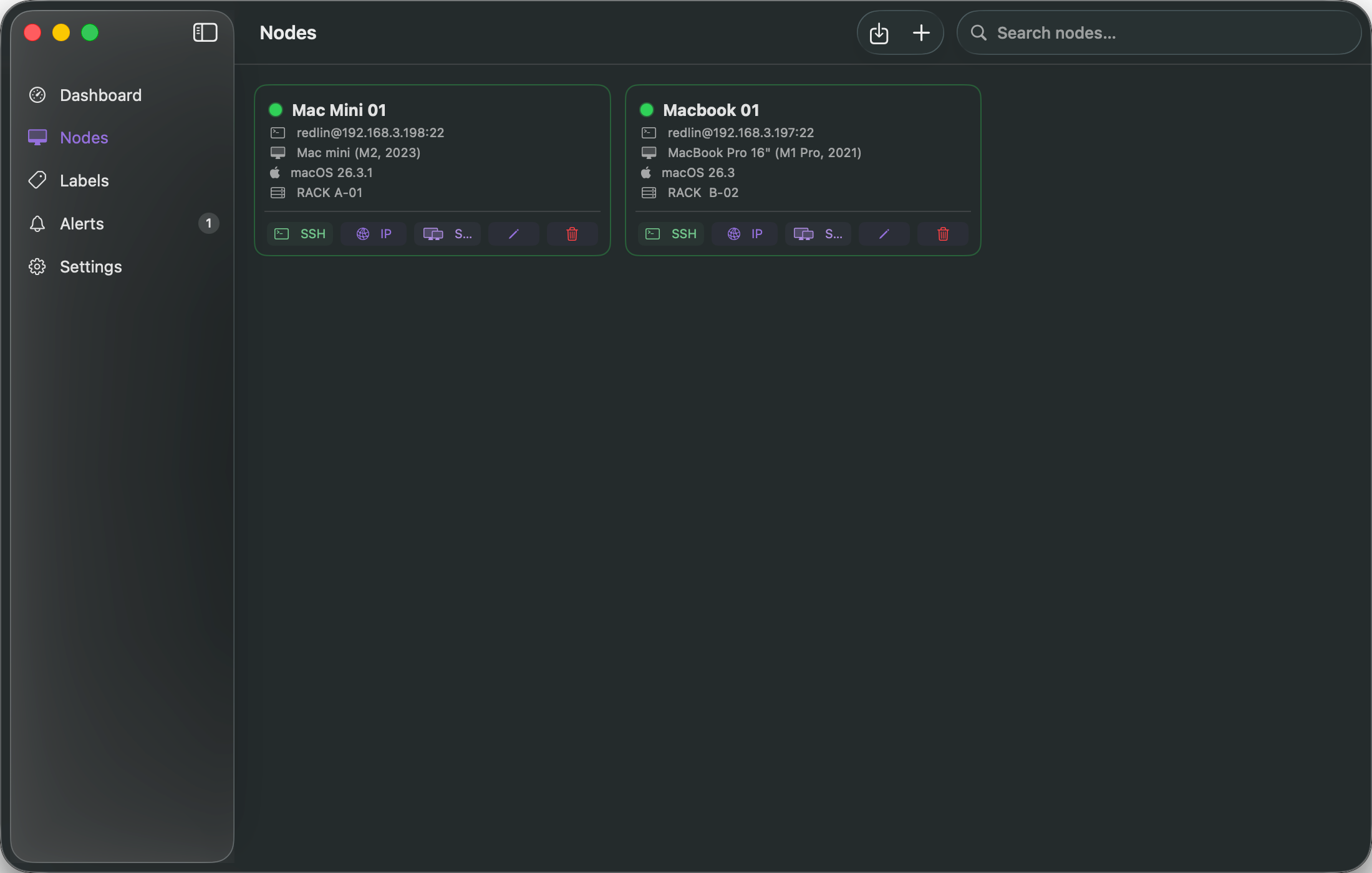
Every Mac Mini in your cluster gets a full profile:
- Connection details — hostname, IP, port, SSH user
- Hardware inventory — model name, macOS version, CPU cores, total RAM, total disk, serial number
- Organization — custom tags (like "storage", "gpu", "build"), rack position labels (like "RACK A-01"), and freeform notes
- Authentication — supports SSH keys, passwords (stored securely in macOS Keychain), or auto-detection
RackMini even recognizes 100+ Mac hardware models by name, so instead of seeing "Mac14,3" you'll see the actual product name.
Already have your nodes set up? Import them directly from your ~/.ssh/config file with one click. No retyping hostnames and ports.
24-Hour Metric History — See What Happened While You Were Away
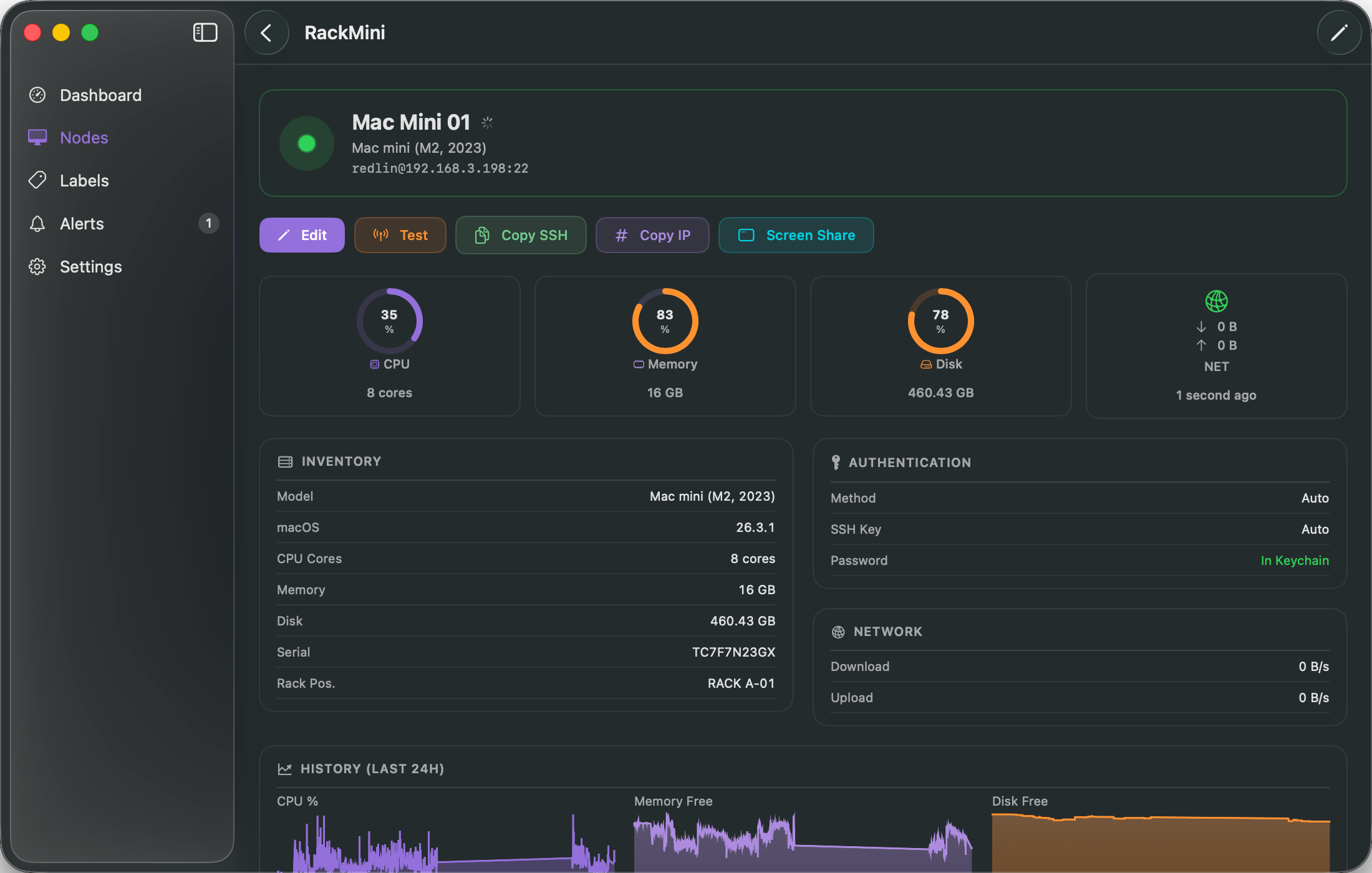
RackMini doesn't just show you what's happening now. It stores metric history so you can see trends over the last 6 hours, 24 hours, or up to 7 days:
- CPU usage over time
- Free memory over time
- Free disk space over time
Each node's detail page shows clean, minimal trend charts — so you can spot the overnight backup that maxed out your CPU, or the disk that's been slowly filling up all week.
Alerts That Tell You Before It's Too Late
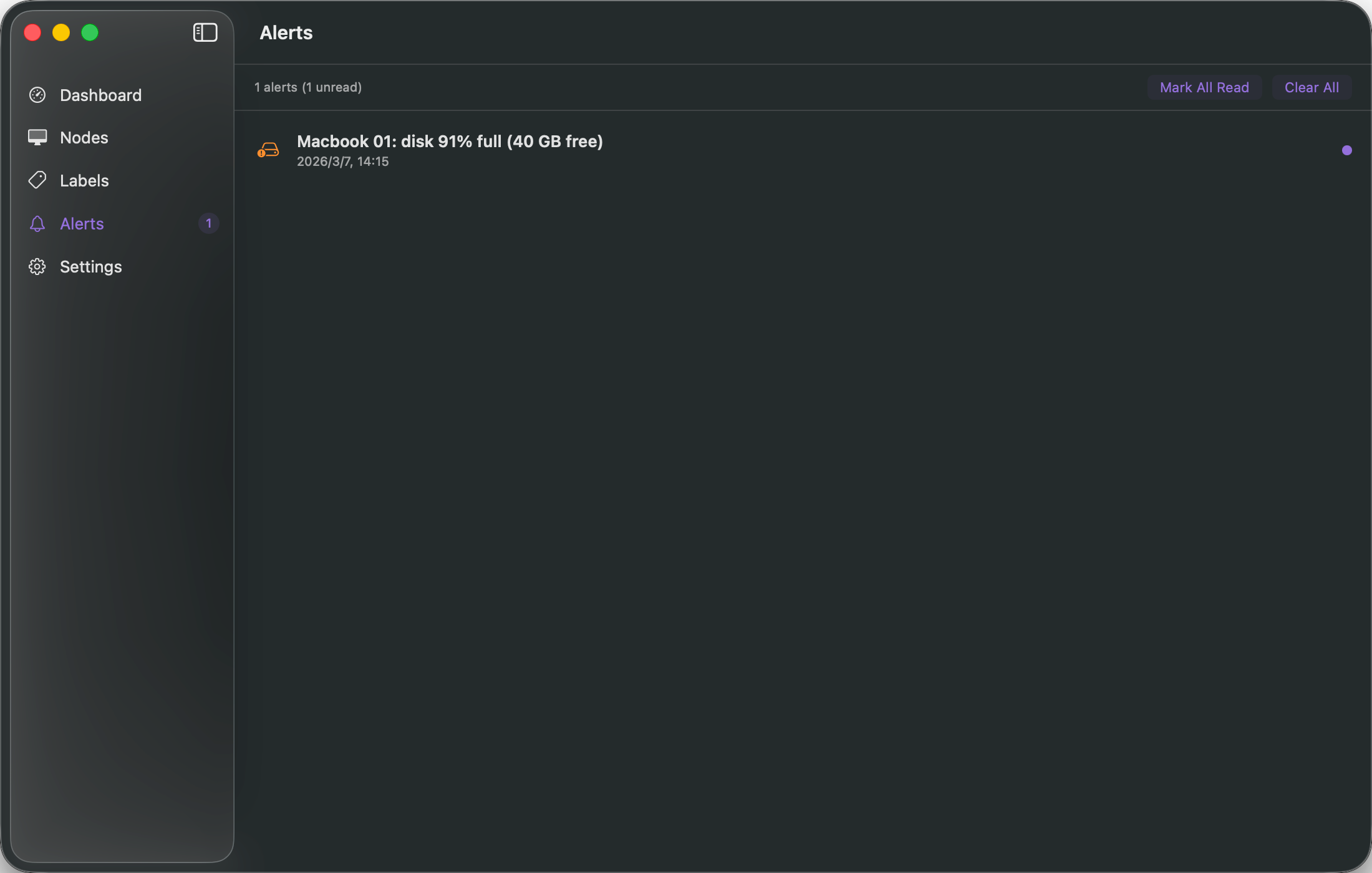
Set thresholds and RackMini watches your cluster for you:
- Node goes offline — get notified when a machine drops off the network
- CPU too high — catch runaway processes before they cause problems
- Memory maxed out — know when a node is under pressure
- Disk running low — never lose data because a drive filled up silently
- Load average spikes — detect sustained heavy load
Alerts show up in the app with an unread count badge, and you can enable native macOS notifications so you see them even when the app is in the background. A configurable cooldown prevents alert spam.
The Feature Nobody Else Has: Printable Labels
This is the one we're most proud of, because it solves a problem that no monitoring tool has ever touched.
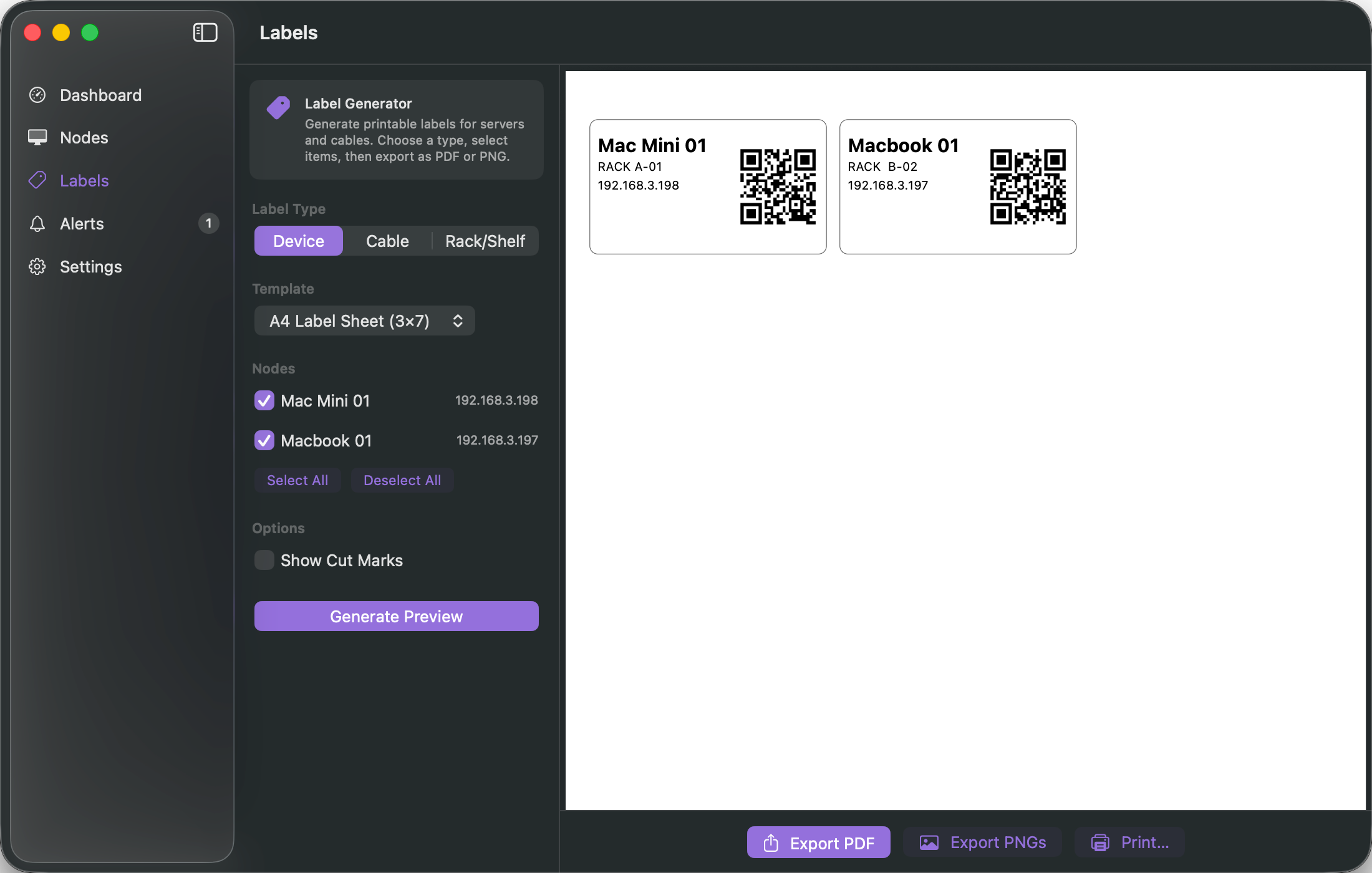
RackMini generates professional, printable labels for your hardware and cables.
Device Labels
Select your nodes and print labels that include:
- Node name
- Rack position
- IP address
- Tag badge
- A QR code that encodes the SSH connection string — scan it and connect
Cable Labels
Define your cable connections (Ethernet, Power, Thunderbolt, USB) and print labels showing:
- Source and destination (e.g., "SW1-07 to MINI-03")
- Cable type, color-coded by kind
- IP address for network cables
Rack Labels
Print labels for your rack shelves showing which nodes live where.
Export Options
- PDF — vector, print-ready, professional quality
- PNG — for embedding in documentation
- Direct print — send straight to your printer
- Supports A4 label sheets (3x7 grid, 21 labels per page) and thermal label printers (62x29mm)
- Optional cut marks for precise manual cutting
If you've ever written on masking tape with a Sharpie to label a cable, you understand why this matters.
Built for Mac, Not Ported to Mac
RackMini is a native SwiftUI app. It's not an Electron wrapper around a web dashboard. It's not a Docker container running a web UI. It's a real macOS application that:
- Runs natively on Apple Silicon and Intel
- Uses macOS Keychain for secure password storage
- Supports System, Light, and Dark appearance modes
- Feels like a first-party Apple app, because it's built with the same frameworks Apple uses
There are zero external dependencies. No npm install. No Docker. No YAML configuration files. Just download and open.
Who Is RackMini For?
- Homelabbers running a small Mac Mini stack for media, backups, or experimentation
- Developers using Mac Minis as a local build farm or CI cluster
- Creative professionals with render nodes for video or 3D work
- Small teams managing a handful of Mac Minis for internal services
- AI/ML enthusiasts running local models on Apple Silicon clusters
- Anyone who has more than one Mac Mini and is tired of managing them with sticky notes and Terminal
What RackMini Is Not
- It's not a cloud service — your data never leaves your machine
- It's not a remote management tool — it doesn't install agents on your nodes
- It's not enterprise software — no license keys, no seat limits, no complexity
- It's not just for our accessories customers — it works with any Mac Mini setup, whether your machines are in a rack mount or stacked on a shelf
Coming Soon
RackMini is in active development and launching soon. We're building this because we needed it ourselves — and because we believe the Mac Mini cluster community deserves better tools, not just better hardware.
Want to be the first to know when it's available?
Sign up for our mailing list or follow us for launch updates. Whether you're running two Mac Minis or ten, RackMini is the management app your cluster has been missing.
We're a Mac Mini accessories store — selling rack mounts, cases, stands, and cable management solutions. RackMini is our software companion: a free native macOS app that helps you manage the cluster your hardware deserves. Because great accessories deserve great software.