

3D-Printed Stacking & Rack Solutions for Multi-Mac-Mini Setups | Series 3
Par Doxmini Team
One Mac mini is a computer. Two is a project. Three or more is a cluster.
Why People Are Running Multiple Mac Minis
Something interesting has been happening in the developer community. The M4 Mac mini — with its Neural Engine, unified memory architecture, and absurdly small footprint — has quietly become the building block of choice for a growing number of multi-machine setups. And the use cases are fascinating:
Distributed AI inference with Exo. The Exo project lets you pool multiple Apple Silicon machines into a single distributed inference cluster. Instead of buying one expensive machine with 192GB of RAM, you can network several Mac minis together and run large language models across them. Two M4 Pro Mac minis with 48GB each gives you 96GB of unified memory for LLM inference — at a fraction of the cost of a single Mac Studio Ultra.
Local LLM hosting with Ollama and LM Studio. Developers are running multiple instances of Ollama across Mac mini clusters to serve different models simultaneously — one for code completion, one for chat, one for embeddings. Each Mac mini handles its own model, and a simple load balancer routes requests.
CI/CD build farms. With native ARM compilation, a cluster of Mac minis makes an excellent CI/CD pipeline for iOS and macOS apps. Each mini can run a build agent, and the cluster parallelizes your test suite across machines.
Blender and video render farms. The M4's GPU is surprisingly capable for rendering. A stack of Mac minis running Blender's distributed rendering can chew through animation frames faster than a single high-end machine.
Home lab and self-hosting. Some developers run dedicated Mac minis for Home Assistant, Plex, file servers, and development environments — each machine purpose-built for its task.
The problem? When you have two, three, or five Mac minis, they take up a lot of desk space and cable management becomes a nightmare. That's where these 3D-printed stacking and rack solutions come in.
1. Mac Mini "Rack Pro" Set -- The Ultimate Miniature Server Rack
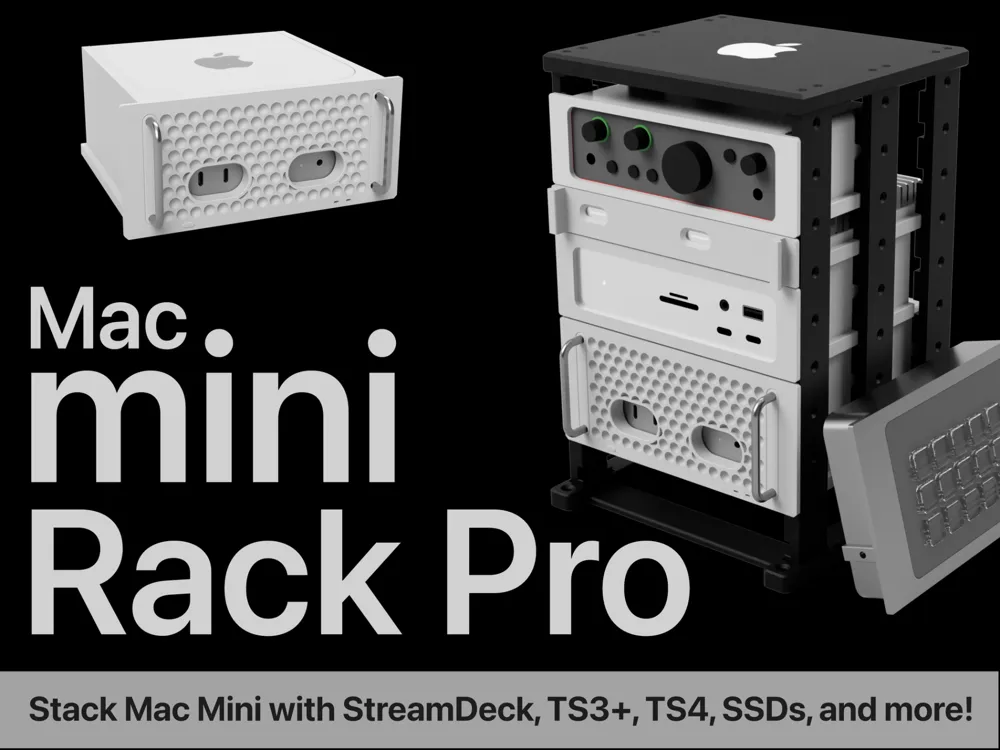
Designer: Jerrod H (@Jerrodh) Vibe: "You just knew I had to do it."
If you loved Jerrod's "Mac Mini Pro" enclosure from Series 1, you're going to lose your mind over this one. He took his iconic Mac Pro-inspired enclosure and turned it into a full miniature rack system — with actual functionality.
This isn't just a stack. It's a proper rack with standardized 1U units (25mm high, 146mm wide between rails), vertical rails, and slide-in modules. Each piece of equipment gets its own enclosure that slots into the rack like a real server room setup.
What makes it insane:
- Standardized 1U rack units — everything slides in and out like a real data center rack
- Compatible modules for popular accessories: CalDigit TS3+, TS4, OWC Thunderbolt docks, Anker 577, and more
- Half-height rails option that fits a Mac mini with 2U to spare plus ventilation
- Add-on accessories: shelf, drawers, spacers, keystone panel, cable pass-through
- STEP files provided for designing your own custom modules
- Modules secure with M3 flat-head cap screws into heat-set inserts
- 121 comments of active community discussion and custom module requests
Jerrod actively maintains this design, with updates adding new dock modules, ventilation slots, and community-requested features. The STEP template files mean the community can (and does) design their own rack modules for any hardware.
If you're running a serious multi-Mac-mini setup, this is the gold standard.
2. M4 Mac Mini Stack -- Simple, Sturdy, Purpose-Built
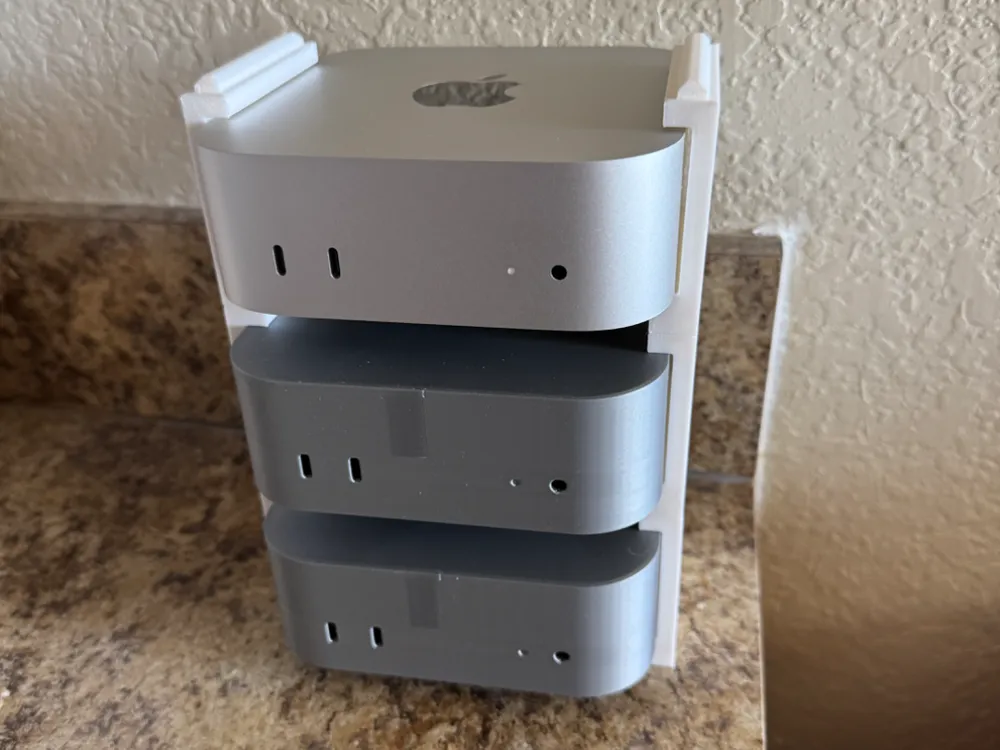
Designer: mikechu01 Vibe: "Stack 'em and forget 'em."
Sometimes you don't need a miniature data center rack. You just need to stack a bunch of Mac minis neatly and get on with your life. That's exactly what this print delivers.
The M4 Mac Mini Stack is designed explicitly for distributed computing — Blender rendering, running AI models, or any workload that benefits from multiple machines. It's straightforward: a cradle that holds each Mac mini with enough clearance to reach the power button on the back.
Why it works:
- Purpose-built for distributed computing — the designer calls out Blender rendering and AI models as primary use cases
- Power button access — enough finger clearance to reach the back button without disassembling
- 1.5-hour print time per unit on a single plate — fast to produce
- 168 downloads and growing, with a DGX Spark/Dell Pro Max remix already available
- PETG recommended for heat resistance, but PLA works for lighter workloads
- Creative Commons licensed — modify and share freely
This is a "set it and forget it" design. Stack your minis, plug in the cables, and let your cluster do its thing. Not fancy, but exactly what you need.
3. Chainable Mac Mini Stand -- Infinite Expansion
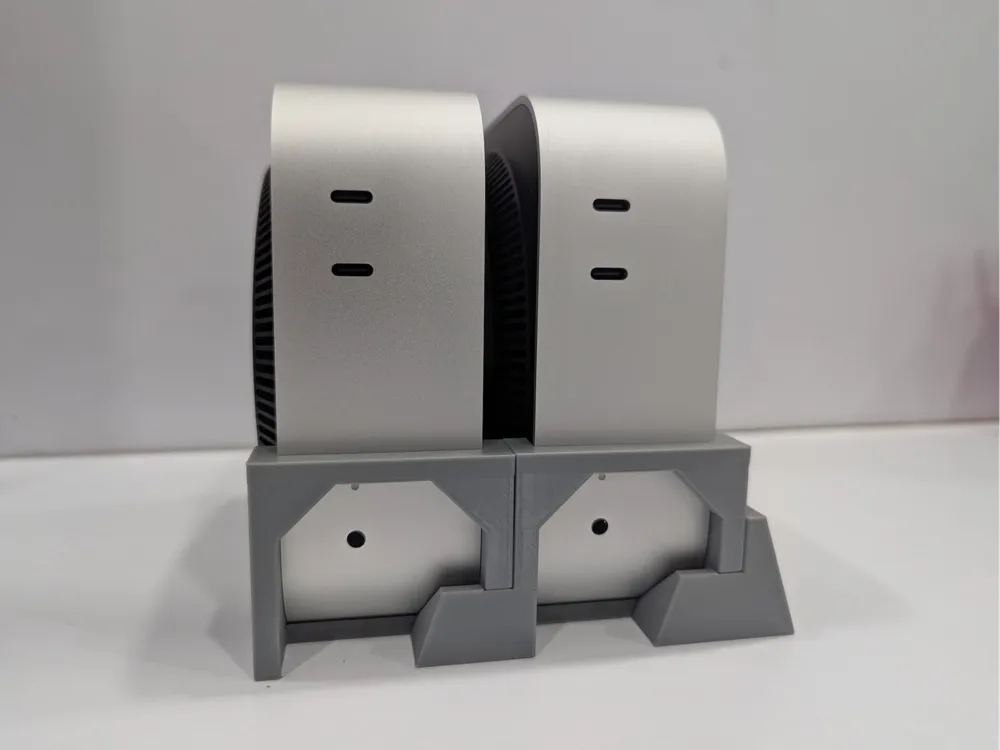
Designer: KN (@user_990631567) Vibe: "How many Mac minis? Yes."
The concept is brilliant in its simplicity: modular stand segments that chain together. Need two Mac minis? Print two segments. Need five? Print five. Need twelve? Well, you might want to rethink your life choices, but yes, print twelve.
This is a remix of KN's original Infinite Chainable Mac Mini Cluster Stand, updated specifically for the M4 Mac mini's dimensions. The system uses three piece types — a stand head, stand body, and stand tail — that snap together in any combination.
What makes it flexible:
- Truly infinite scaling — add segments as your cluster grows
- Mix and match — use a stand head + bodies + stand tail, or skip the head for tight spaces
- 4 plates, 5.2 hours for a full set — reasonable for the modularity you get
- Perfect 5.0 rating from users running everything from math research clusters to home labs
- Community members are already asking about SSD expansion modules
- Creative Commons licensed — remix-friendly for custom needs
One user commented: "We are going to put these to use on our small cluster for math research." Another is using them for a Blender render farm. The chainable design means your rack grows with your ambitions.
4. Stackable Top Adapter -- Add Stacking to Any Stand
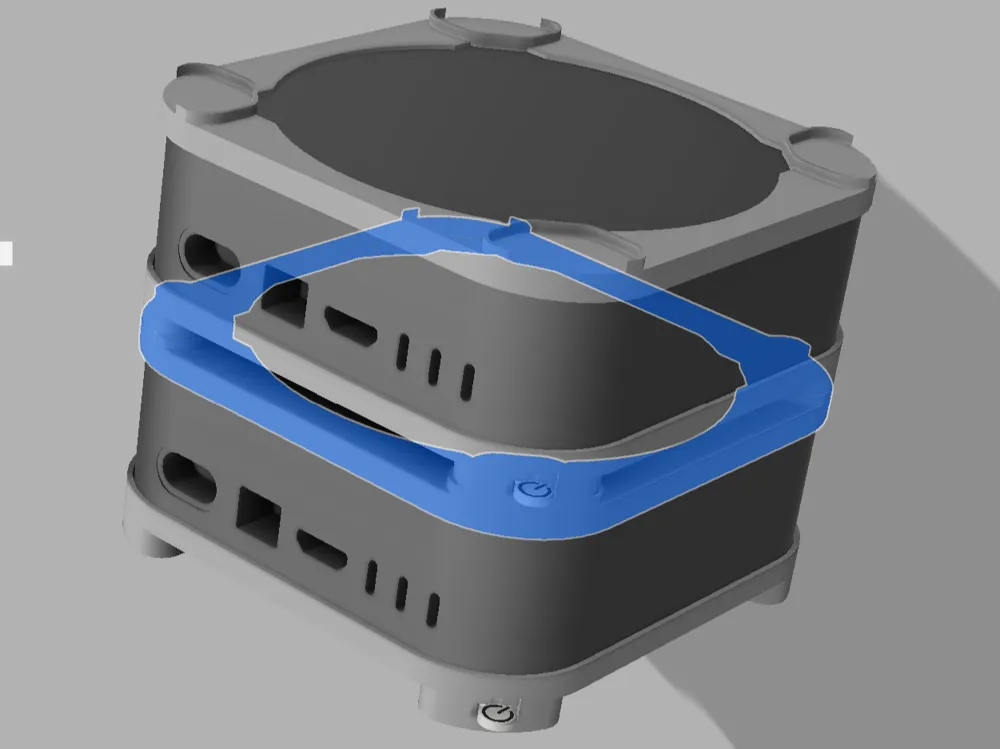
Designer: Jerry Xie (@jerxie) Vibe: "Turn any stand into a multi-story building."
Here's a clever approach: instead of designing a whole new stacking system, Jerry Xie created an add-on adapter that sits on top of his existing Mac mini holding stand and lets you stack another Mac mini on top. It's modular in the truest sense — buy into the system one piece at a time.
Why it's smart:
- 43-minute print on a single plate — the fastest print in this entire roundup
- Works with existing stands — complements Jerry's holding stand design rather than replacing it
- Power button access maintained — no need to flip devices to press the power button
- Stable stacking — designed for proper weight distribution across multiple units
- Creative Commons licensed — adapt it to fit other stand designs
This is ideal if you already have a Mac mini stand you love and just want to add a second (or third) unit on top without starting from scratch. Think of it as a vertical expansion pack.
5. Modular Frame with Cooling, Dust Cover & Accessories -- The Swiss Army Knife
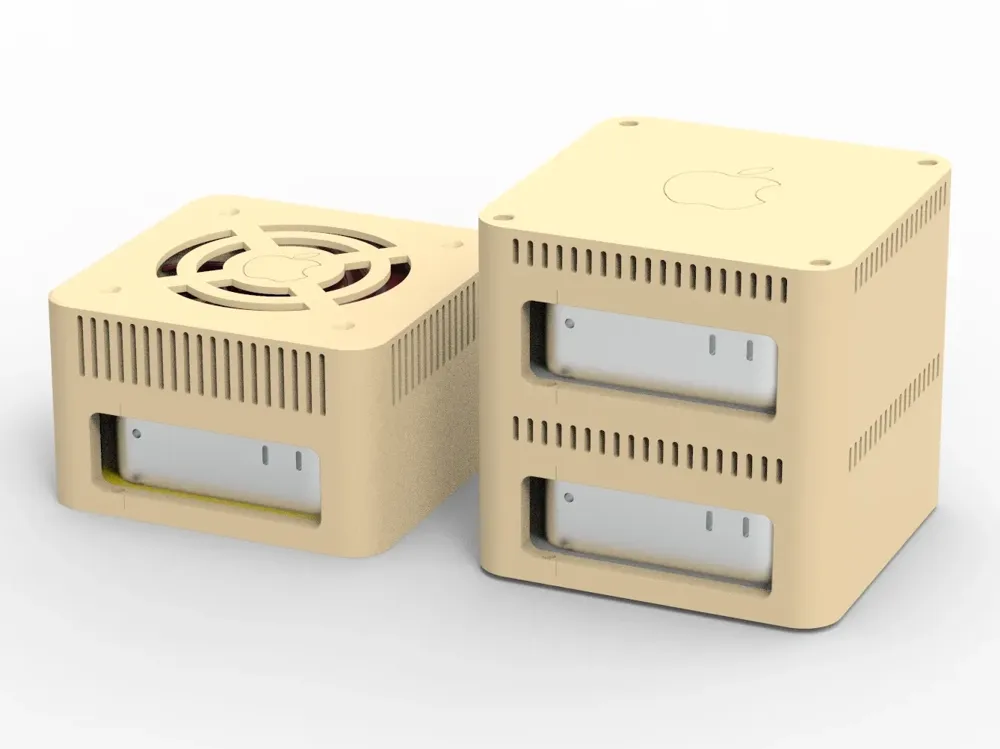
Designer: SheldonMa Vibe: "One frame to rule them all."
This is the most feature-rich design in the roundup. SheldonMa built a modular inverted frame that uses magnets for swappable accessories — and the accessory list is impressive: dust cover, 120mm cooling fan mount, ORICO external hard drive expansion, and a multi-tiered stacking module.
The frame defaults to an inverted placement of the Mac mini (power button on top), which is clever for multi-unit setups where you need quick access to each machine's power button.
The full feature set:
- Magnetic modular system — 8x2mm magnets connect accessories to the frame
- 120mm fan cooling module — real active cooling for sustained workloads (fan purchased separately)
- Dust cover module — protect your intake from debris
- ORICO hard drive expansion — mount external storage directly onto the frame
- Multi-tiered stacking — stack multiple framed Mac minis vertically
- TPU protective inner frame — prevents scratches to the Mac mini's finish during installation
- 4 print profiles covering different configurations and versions
- M3 screws and nuts for solid assembly, foam pads for anti-slip
Version 1.2 added power button access improvements and the ORICO expansion frame. The designer is clearly iterating based on real-world usage, which is exactly what you want in a tool you'll use every day.
If you're running Mac minis under sustained load (ML training, video rendering, CI builds), the active cooling module alone makes this worth printing.
Choosing the Right Solution
| Solution | Best For | Scaling | Print Time | Complexity |
|---|---|---|---|---|
| Rack Pro Set | Serious setups with accessories | 1U modular | Variable | High |
| Mac Mini Stack | Quick & simple stacking | Vertical stack | 1.5h/unit | Low |
| Chainable Stand | Growing clusters | Infinite chain | 5.2h/set | Medium |
| Stackable Adapter | Adding to existing stands | 2-3 units | 43 min | Low |
| Modular Frame | Heavy workloads needing cooling | Multi-tier | 5-19h | High |
My recommendation:
- Just getting started? Print the Mac Mini Stack — it's fast, simple, and gets the job done.
- Planning to grow? Go with the Chainable Stand — add segments as you add machines.
- Running heavy workloads? The Modular Frame with cooling fan is worth the extra print time.
- Want the full experience? The Rack Pro Set is unmatched if you're building a proper mini server setup with docks and accessories.
Tips for Multi-Mac-Mini Setups
Beyond the physical stacking, here are some practical tips for running multiple Mac minis:
- Use PETG or better — multiple machines generate more heat than one. PLA will warp over time.
- Label your machines — use colored filament or printed labels. When you have four identical silver boxes, you'll thank yourself.
- Network with Thunderbolt — for Exo clusters and distributed computing, Thunderbolt networking between Mac minis provides significantly lower latency than Ethernet.
- Centralize power — a single high-quality power strip with surge protection is better than multiple outlets.
- Monitor temperatures — use
sudo powermetricsor a tool like TG Pro to keep tabs on thermals across your fleet. - Consider airflow direction — the Mac mini intakes from the bottom and exhausts from the back. Make sure your stacking solution doesn't block either.
Series 4 Is Here!
Want to turn your Mac mini into a complete retro computer? Check out Series 4: Retro Computer Builds — featuring a miniature eMac with working speakers, a classic Macintosh with an iPad mini display, and a full retro desktop build with integrated screen and keyboard.
The Series So Far
- Series 1: Fun & Creative Cases and Stands — Mac Mini Pro enclosure, Mars Rover stand, and more
- Series 2: Popular & Useful Accessories — Under-desk mounts, power button solutions, ventilated stands
- Series 3: Multi-Mac-Mini Stacking & Rack Solutions — Miniature server racks, chainable stands, modular frames
- Series 4: Retro Computer Builds — All-in-one retro computers with integrated screens and speakers
All models featured are free to download for personal use. Always check individual model licenses before commercial use. Links and stats were verified at time of writing.
Running a Mac mini cluster? We'd love to hear what you're using it for — drop your setup in the comments!